Block entities & GUIs
A block that remembers a number, a box that holds your things, and a machine that looks alive while it works.
So far our blocks have been furniture, they sit there and look the way we told them to. A block entity gives a block a memory: a small bag of data attached to one position in the world, ticking, saving, loading, surviving the night. Vanilla uses them for chests, furnaces, and signs. We'll build three, each more ambitious than the last.
We'll go in order of nerve: first a block that just counts your clicks, then a crate with its own window, then a fuel-burning freezer whose progress bars actually move on every screen in a multiplayer game. The last one is the whole reason this page exists, but the first two earn it.
Part 1, The Counter Block
State that saves.
The smallest interesting block entity is a single integer. Right-click the block and the number goes up; close the world, reopen it tomorrow, and the number is exactly where you left it. That's the promise of a block entity, distilled to one field.
Two classes do it. The block entity holds the data and knows how to write and read it; the block creates the entity and reacts to clicks. Here's the data half:
package com.example.example_mod;

import net.minecraft.block.entity.BlockEntity;
import net.minecraft.nbt.NbtCompound;

public class ExampleCounterBlockEntity extends BlockEntity {

	public int clicks = 0;

	@Override
	public void writeNbt(NbtCompound nbt) {
		super.writeNbt(nbt);
		nbt.putInt("Clicks", this.clicks);
	}

	@Override
	public void readNbt(NbtCompound nbt) {
		super.readNbt(nbt);
		this.clicks = nbt.getInt("Clicks");
	}
}
That's the entire persistence contract: extend BlockEntity, override writeNbt and readNbt, and, this part is not optional, call super first in each. The superclass writes the block entity's own position and identity into the tag; skip the super call and the game can't find your data again on load. Inside, you read and write your fields by name, like keys in a dictionary.
The NBT key "Clicks" is private to this class, call it whatever you like. But once your mod ships, treat it as load-bearing: rename it and every existing counter in every saved world silently resets to zero, because readNbt looks for a key that no longer exists.
Now the block. It extends BlockWithEntity, hands back a fresh entity from createBlockEntity(), and does the actual work in onUse:
package com.example.example_mod;

import net.minecraft.block.BlockWithEntity;
import net.minecraft.block.entity.BlockEntity;
import net.minecraft.block.material.Material;
import net.minecraft.entity.player.PlayerEntity;
import net.minecraft.world.World;

public class ExampleCounterBlock extends BlockWithEntity {

	public ExampleCounterBlock(int id) {
		super(id, Material.STONE);
	}

	@Override
	protected BlockEntity createBlockEntity() {
		return new ExampleCounterBlockEntity();
	}

	@Override
	public boolean onUse(World world, int x, int y, int z, PlayerEntity player) {
		BlockEntity be = world.getBlockEntity(x, y, z);
		if (be instanceof ExampleCounterBlockEntity) {
			ExampleCounterBlockEntity counter = (ExampleCounterBlockEntity) be;
			counter.clicks++;
			counter.markDirty(); // tells the world this block entity needs saving

			// Custom sound: assets/example_mod/sounds/sound/counter/click.ogg is
			// auto-loaded by RetroAPI under the event id "example_mod:counter.click".
			world.playSound(x + 0.5, y + 0.5, z + 0.5, "example_mod:counter.click", 1.0F, 1.0F);

			if (!world.isRemote) {
				player.sendMessage("Counter: " + counter.clicks + " (saved with the world!)");
			}
		}
		return true; // we handled the click, don't place blocks/use items through it
	}
}
Three lines in onUse deserve a moment. counter.clicks++ changes the field, but the world doesn't know anything happened until you call counter.markDirty(), that's the flag that says "save me when you next save the chunk." Forget it and your increments evaporate at the next reload. The world.playSound line plays the click sound RetroAPI auto-loaded in Textures, names & files. And the !world.isRemote guard keeps the chat message on the authoritative side, more on that distinction below.
Both halves are registered together in init(), and the order matters: register the block entity class first, then the block whose createBlockEntity() returns one.
// ...then register the block whose createBlockEntity() returns one.
RetroBlockEntities.register(id("counter"), ExampleCounterBlockEntity.class);
COUNTER_BLOCK = RetroBlockAccess.of(new ExampleCounterBlock(RetroBlockAccess.allocateId()))
	.sounds(Block.STONE_SOUND_GROUP)
	.strength(1.5f)
	.texture(id("counter_block"))
	.register(id("counter_block"));
Its texture lives at src/main/resources/assets/example_mod/textures/block/counter_block.png.

The string id "counter" passed to RetroBlockEntities.register is written into your world's NBT as the name of every counter's saved data. Never change it after release. Rename it and every counter in every existing world becomes an orphan the game can't reconstruct. Pick the name once and live with it forever, exactly the same rule as the NBT keys inside writeNbt.
Here's the quiet magic underneath. Vanilla Beta 1.7.3 stores block entities inside the chunk file. If we let a modded one land there, the world would refuse to open in unmodded Minecraft. So RetroAPI keeps modded block entities in an inventory sidecar, a separate file alongside the vanilla chunk data. Open your world in plain Beta 1.7.3 and it loads fine; the counters simply aren't there. Put the mod back and they reappear, clicks and all. You write ordinary writeNbt/readNbt code and never think about it.
Part 2, The Crate
A container with its own GUI.
A counter holds one number. A crate holds twelve item stacks and shows you a window to rearrange them. That jump, from a field to a full container GUI, introduces a third class and a clean division of labor. Hold this table in your head for the rest of the page; the freezer uses the exact same shape.
| Piece | Class | Runs on | Job |
|---|---|---|---|
| Block entity | ExampleCrateBlockEntity | server + client | holds the items, saves them to NBT |
| Container | ExampleCrateContainer | server + client | the slots and the click/shift-click logic |
| Screen | ExampleCrateScreen | client only | draws the window |
The Container is what most engines call a ScreenHandler: the server-authoritative object that owns the slots and validates every move. The Screen is just paint, it must never be loaded on a dedicated server, which has no graphics. Keep those two facts straight and containers stop being scary.
This crate is based on matthewperiut/crates-fabric-b1.7.3.
The block entity, a 12-slot inventory by hand
There's no "give me an inventory" helper here; you implement the Inventory interface yourself. It's more code than you'd guess, but every method is short and obvious, and this is exactly what vanilla chests and furnaces do internally. The contents are an ItemStack[]; the methods are the rules for reading, taking from, and writing to it.
package com.example.example_mod;

import net.minecraft.block.entity.BlockEntity;
import net.minecraft.entity.player.PlayerEntity;
import net.minecraft.inventory.Inventory;
import net.minecraft.item.ItemStack;
import net.minecraft.nbt.NbtCompound;
import net.minecraft.nbt.NbtList;

public class ExampleCrateBlockEntity extends BlockEntity implements Inventory {

	private ItemStack[] contents = new ItemStack[12];

	@Override
	public int size() {
		return this.contents.length;
	}

	@Override
	public ItemStack getStack(int slot) {
		return this.contents[slot];
	}

	@Override
	public ItemStack removeStack(int slot, int amount) {
		ItemStack stack = this.contents[slot];
		if (stack == null) {
			return null;
		}
		if (stack.count <= amount) {
			// taking everything: empty the slot
			this.contents[slot] = null;
			this.markDirty();
			return stack;
		}
		// taking part of the stack: split it
		ItemStack taken = stack.split(amount);
		if (stack.count == 0) {
			this.contents[slot] = null;
		}
		this.markDirty();
		return taken;
	}

	@Override
	public void setStack(int slot, ItemStack stack) {
		this.contents[slot] = stack;
		if (stack != null && stack.count > this.getMaxCountPerStack()) {
			stack.count = this.getMaxCountPerStack();
		}
		this.markDirty();
	}

	@Override
	public String getName() {
		return "Crate"; // drawn as the title by ExampleCrateScreen
	}

	@Override
	public int getMaxCountPerStack() {
		return 64;
	}

	@Override
	public boolean canPlayerUse(PlayerEntity player) {
		// Standard container rules: still placed, and the player is within 8 blocks.
		if (this.world.getBlockEntity(this.x, this.y, this.z) != this) {
			return false;
		}
		return player.getSquaredDistance(this.x + 0.5, this.y + 0.5, this.z + 0.5) <= 64.0;
	}

	@Override
	public void writeNbt(NbtCompound nbt) {
		super.writeNbt(nbt);
		NbtList items = new NbtList();
		for (int slot = 0; slot < this.contents.length; slot++) {
			if (this.contents[slot] != null) {
				NbtCompound entry = new NbtCompound();
				entry.putByte("Slot", (byte) slot);
				this.contents[slot].writeNbt(entry);
				items.add(entry);
			}
		}
		nbt.put("Items", items);
	}

	@Override
	public void readNbt(NbtCompound nbt) {
		super.readNbt(nbt);
		NbtList items = nbt.getList("Items");
		this.contents = new ItemStack[this.size()];
		for (int i = 0; i < items.size(); i++) {
			NbtCompound entry = (NbtCompound) items.get(i);
			int slot = entry.getByte("Slot") & 255;
			if (slot >= 0 && slot < this.contents.length) {
				this.contents[slot] = new ItemStack(entry);
			}
		}
	}
}
The save format is worth recognizing because it's vanilla's own: an NBT list named "Items", one compound per occupied slot, each tagged with a "Slot" byte so empty slots cost nothing. canPlayerUse enforces the two classic container rules, the block must still exist (you didn't mine it out from under the open window) and the player must be within 8 blocks (64 squared). And again, RetroAPI's inventory sidecar quietly carries all of this, modded items included, so the world stays vanilla-openable.
The container, slots, coordinates, and shift-click
The Container adds Slot objects in a fixed order, and each slot's x/y are pixel coordinates measured against the GUI art. Get them right and items land where the picture says they should.
package com.example.example_mod;

import net.minecraft.entity.player.PlayerEntity;
import net.minecraft.entity.player.PlayerInventory;
import net.minecraft.inventory.Inventory;
import net.minecraft.item.ItemStack;
import net.minecraft.screen.ScreenHandler;
import net.minecraft.screen.slot.Slot;

public class ExampleCrateContainer extends ScreenHandler {

	/** A slot that refuses certain items, here: no crates inside crates. */
	private static class CrateSlot extends Slot {
		public CrateSlot(Inventory inventory, int index, int x, int y) {
			super(inventory, index, x, y);
		}

		@Override
		public boolean canInsert(ItemStack stack) {
			return allowedInCrate(stack);
		}
	}

	private static boolean allowedInCrate(ItemStack stack) {
		return stack.itemId != ExampleMod.CRATE_BLOCK.id;
	}

	private static final int CRATE_SLOTS = 12;

	public ExampleCrateContainer(PlayerInventory playerInventory, ExampleCrateBlockEntity crate) {
		// The crate's 4x3 grid.
		for (int row = 0; row < 3; row++) {
			for (int col = 0; col < 4; col++) {
				this.addSlot(new CrateSlot(crate, row * 4 + col, 53 + col * 18, 26 + row * 18));
			}
		}

		// The player's main inventory (3 rows of 9; indices 9-35)...
		int offset = 28;
		for (int row = 0; row < 3; row++) {
			for (int col = 0; col < 9; col++) {
				this.addSlot(new Slot(playerInventory, col + row * 9 + 9, 8 + col * 18, offset + 84 + row * 18));
			}
		}
		// ...and the hotbar (indices 0-8).
		for (int col = 0; col < 9; col++) {
			this.addSlot(new Slot(playerInventory, col, 8 + col * 18, offset + 142));
		}
	}

	@Override
	public boolean canUse(PlayerEntity player) {
		return true;
	}

	/** Shift-click: crate slots dump into the inventory, inventory dumps into the crate. */
	@Override
	public ItemStack quickMove(int slotIndex) {
		ItemStack moved = null;
		Slot clicked = this.slots.get(slotIndex);

		if (clicked != null && clicked.hasStack()) {
			ItemStack stack = clicked.getStack();
			moved = stack.copy();
			if (slotIndex < CRATE_SLOTS) {
				this.insertItem(stack, CRATE_SLOTS, this.slots.size(), true);
			} else if (allowedInCrate(stack)) {
				this.insertItem(stack, 0, CRATE_SLOTS, false);
			}

			if (stack.count == 0) {
				clicked.setStack(null);
			} else {
				clicked.markDirty();
			}
		}

		return moved;
	}
}
The custom CrateSlot overrides canInsert to forbid one thing, putting a crate inside a crate, which would be a tidy recursion bomb. That single override is the general pattern for "this slot only accepts fuel," "this slot only accepts armor," and so on. The quickMove method handles shift-click: a stack in a crate slot dumps into your inventory, a stack in your inventory tries the crate (if it's allowed in). The slot indices are everything here, 0..11 is the crate, the rest is the player.
The screen, paint, and nothing else
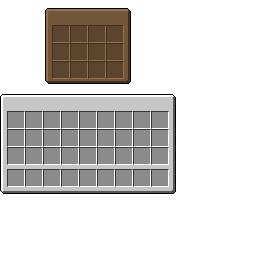
The Screen is client-only. It extends HandledScreen, sizes the window, draws the title text in the foreground, and binds the GUI texture in the background. Notice what it does not do: no item logic, no validation. That all lives in the Container, on the server.
package com.example.example_mod;

import org.lwjgl.opengl.GL11;

import net.minecraft.client.gui.screen.ingame.HandledScreen;
import net.minecraft.entity.player.PlayerInventory;

public class ExampleCrateScreen extends HandledScreen {

	private static final String TEXTURE = "/assets/example_mod/textures/gui/crategui.png";

	private final String name;

	public ExampleCrateScreen(PlayerInventory playerInventory, ExampleCrateBlockEntity crate) {
		super(new ExampleCrateContainer(playerInventory, crate));
		this.name = crate.getName();
		this.backgroundWidth = 176;
		this.backgroundHeight = 222;
	}

	@Override
	protected void drawForeground() {
		// Drawn relative to the window's top-left corner.
		this.textRenderer.draw(this.name, 53, 14, 0x121212);
		this.textRenderer.draw("Inventory", 8, this.backgroundHeight - 122, 0x404040);
	}

	@Override
	protected void drawBackground(float tickDelta) {
		int texture = this.minecraft.textureManager.getTextureId(TEXTURE);
		GL11.glColor4f(1.0F, 1.0F, 1.0F, 1.0F);
		this.minecraft.textureManager.bindTexture(texture);
		int left = (this.width - this.backgroundWidth) / 2;
		int top = (this.height - this.backgroundHeight) / 2;
		this.drawTexture(left, top, 0, 0, this.backgroundWidth, this.backgroundHeight);
	}
}
One thing to file away: GUI textures are not atlased the way block and item textures are. You bind the PNG directly by its classpath path through the texture manager. This is the crate window it binds:
Opening it, from either side
The block's onUse is a single call:
@Override
public boolean onUse(World world, int x, int y, int z, PlayerEntity player) {
	BlockEntity be = world.getBlockEntity(x, y, z);
	if (be instanceof ExampleCrateBlockEntity) {
		ExampleCrateBlockEntity crate = (ExampleCrateBlockEntity) be;
		RetroGuis.openGUI(player, ExampleMod.id("crate"), crate,
			new ExampleCrateContainer(player.inventory, crate));
	}
	return true;
}
And the common-side registration sits beside the block entity in init(), but the GUI's client half lives in the client entrypoint, because it names a Screen class a dedicated server must never load:
RetroBlockEntities.register(id("crate"), ExampleCrateBlockEntity.class);
CRATE_BLOCK = RetroBlockAccess.of(new ExampleCrateBlock(RetroBlockAccess.allocateId()))
	.sounds(Block.WOOD_SOUND_GROUP)
	.strength(2.0f)
	.alwaysEffectiveTool()
	.alwaysDrops()
	.texture(id("crate_block"))
	.register(id("crate_block"));
Its texture lives at src/main/resources/assets/example_mod/textures/block/crate_block.png.

// The client half of the crate GUI (the common half is in ExampleMod.init).
// Two factories: how to build the screen, and how to build a stand-in
// inventory on remote clients (multiplayer), which have no real block entity.
RetroGuiRegistry.register(ExampleMod.id("crate"), new RetroGuiHandler(
	(player, inventory) -> new ExampleCrateScreen(player.inventory, (ExampleCrateBlockEntity) inventory),
	ExampleCrateBlockEntity::new));
That RetroGuiHandler takes two factories, and the second one is the subtle one. The first is the screen builder, given a player and an inventory, make the window. The second is an inventory factory: ExampleCrateBlockEntity::new. On a remote multiplayer client there is no real block entity object, the client never ran the placing logic, so RetroAPI builds a stand-in inventory with this factory, and the synced contents flow into it. Singleplayer has the real block entity and uses it directly; the factory is the bridge for everyone else.
That's why RetroGuis.openGUI(player, id, inventory, container) can be called from common code without an isRemote check. It is side-independent by design: in singleplayer it opens the registered screen directly; on a dedicated server it sends RetroAPI's retroapi:open_gui packet, and the client rebuilds the very same screen from the very same registration. One call, both worlds.
Part 3, The Freezer
The synced-variables chapter. This is the heart of the whole guide.
Here's the pitch: drop any furnace fuel in the bottom slot, a water bucket in the top, and the machine freezes the water into ice, leaving the empty bucket behind in the input slot. Coal works. Wood works. So does our own Suspicious Substance, because it's registered as fuel (Recipes & fuel). It is, in every mechanical way, a furnace that makes cold instead of heat.
The freezer is based on the Aether's freezer (aether-fabric-b1.7.3), a real machine from a real mod, simplified to its essentials.
It reuses the crate's three-piece shape exactly: a block entity that holds items and ticks, a container, a client screen. What's new is the part you can't store in an item slot, the live state of a working machine: how far along the freeze is, how much fuel is left, how big the last fuel item was. Three plain integers. Getting those three integers onto every player's screen is the entire lesson.
One render gotcha worth knowing before we start. The freezer is also a directional block: a single facing state, set from the placer, that a blockstate JSON turns into a y-rotated orientable model so the frosted door always faces you (the same pattern as Blocks's directional blocks and Models & render layers's models). A plain RetroAPI block gets the MODEL render type wired up automatically once it has a blockstate JSON, but a block with a block entity does NOT, because BlockWithEntity overrides getRenderType() and shadows the value RetroAPI set. So a block-entity block that wants to render a JSON model (rather than a featureless cube, with no front face in the world or the inventory icon) has to return the model render type itself:
@Override
public int getRenderType() {
	// Render the orientable JSON model (in the world AND the inventory icon),
	// not the block-entity default. Required because BlockWithEntity overrides
	// getRenderType and shadows the type RetroAPI wired up from the blockstate.
	return RenderType.resolve(RenderTypes.MODEL);
}
The block entity, three fields and a tick
package com.example.example_mod;

import com.periut.retroapi.register.recipe.RetroRecipes;

import net.minecraft.block.Block;
import net.minecraft.block.entity.BlockEntity;
import net.minecraft.entity.player.PlayerEntity;
import net.minecraft.inventory.Inventory;
import net.minecraft.item.Item;
import net.minecraft.item.ItemStack;
import net.minecraft.nbt.NbtCompound;
import net.minecraft.nbt.NbtList;

public class ExampleFreezerBlockEntity extends BlockEntity implements Inventory {

	/** Ticks of freezing needed to turn one water bucket into ice (10 seconds). */
	public static final int FREEZE_TICKS = 200;

	/** How far the current item has frozen (0..FREEZE_TICKS). Synced as property 0. */
	public int progress = 0;
	/** Fuel ticks left in the tank. Synced as property 1. */
	public int fuelRemaining = 0;
	/** Size of the last fuel item, so the flame can drain proportionally. Synced as property 2. */
	public int fuelTotal = 0;

	private ItemStack[] contents = new ItemStack[3];

	/** Burn ticks for a stack: vanilla fuels + RetroRecipes.addFuel fuels, 0 if not fuel. */
	public static int fuelTime(ItemStack stack) {
		return RetroRecipes.getTotalFuelTime(stack);
	}

	public void tick() {
		boolean wasBurning = this.isBurning();

		if (this.fuelRemaining > 0) {
			this.fuelRemaining--;
			if (this.canFreeze()) {
				this.progress++;
			} else {
				this.progress = 0;
			}
		} else {
			this.progress = 0;
		}

		if (this.world.isRemote) {
			return; // the server decides everything below; clients only animate
		}

		// Finished: ice appears in the output, the input becomes an empty bucket.
		if (this.progress >= FREEZE_TICKS && this.canFreeze()) {
			ItemStack out = this.contents[2];
			if (out == null) {
				this.contents[2] = new ItemStack(Block.ICE, 1);
			} else {
				out.count++;
			}
			this.contents[0] = new ItemStack(Item.BUCKET); // leave the bucket behind
			this.progress = 0;
			this.markDirty();
		}

		// Tank empty but there's work to do and fuel to eat? Consume one fuel item.
		if (this.fuelRemaining <= 0 && this.canFreeze()) {
			int time = fuelTime(this.contents[1]);
			if (time > 0) {
				this.fuelRemaining = time;
				this.fuelTotal = time;
				this.removeStack(1, 1);
				this.markDirty();
			}
		}

		if (wasBurning != this.isBurning()) {
			this.markDirty();
		}
	}

	/** Input is a water bucket and the output has room for more ice. */
	private boolean canFreeze() {
		ItemStack in = this.contents[0];
		if (in == null || in.itemId != Item.WATER_BUCKET.id) {
			return false;
		}
		ItemStack out = this.contents[2];
		return out == null || (out.itemId == Block.ICE.id && out.count < this.getMaxCountPerStack());
	}

	public boolean isBurning() {
		return this.fuelRemaining > 0;
	}

	// ------------------------------------------------------- GUI progress bars --
	// Scaled for drawing: map the tick counts onto a bar that is `pixels` long.

	public int getProgressScaled(int pixels) {
		return this.progress * pixels / FREEZE_TICKS;
	}

	public int getFuelRemainingScaled(int pixels) {
		if (this.fuelTotal == 0) {
			return 0;
		}
		return this.fuelRemaining * pixels / this.fuelTotal;
	}

	// ------------------------------------------------------ Inventory interface --
	// (size/getStack/removeStack/setStack/getName/getMaxCountPerStack/canPlayerUse
	//, identical in shape to the crate's, over a 3-slot array. Trimmed here.)

	// ---------------------------------------------------------------- save/load --

	@Override
	public void writeNbt(NbtCompound nbt) {
		super.writeNbt(nbt);
		nbt.putShort("Progress", (short) this.progress);
		nbt.putShort("Fuel", (short) this.fuelRemaining);
		nbt.putShort("FuelTotal", (short) this.fuelTotal);
		NbtList items = new NbtList();
		for (int slot = 0; slot < this.contents.length; slot++) {
			if (this.contents[slot] != null) {
				NbtCompound entry = new NbtCompound();
				entry.putByte("Slot", (byte) slot);
				this.contents[slot].writeNbt(entry);
				items.add(entry);
			}
		}
		nbt.put("Items", items);
	}

	@Override
	public void readNbt(NbtCompound nbt) {
		super.readNbt(nbt);
		this.progress = nbt.getShort("Progress");
		this.fuelRemaining = nbt.getShort("Fuel");
		this.fuelTotal = nbt.getShort("FuelTotal");
		NbtList items = nbt.getList("Items");
		this.contents = new ItemStack[this.size()];
		for (int i = 0; i < items.size(); i++) {
			NbtCompound entry = (NbtCompound) items.get(i);
			int slot = entry.getByte("Slot") & 255;
			if (slot >= 0 && slot < this.contents.length) {
				this.contents[slot] = new ItemStack(entry);
			}
		}
	}
}
The three fields at the top, progress, fuelRemaining, fuelTotal, are the machine's whole brain. tick() runs them like a furnace: while there's fuel in the tank it counts down and pushes progress forward; when progress fills, ice drops and the bucket empties; when the tank runs dry and there's work to do, it eats one fuel item to refill. Note the this.world.isRemote early return, clients run the animation but the server alone decides when ice appears, so two machines never disagree.
The two scaled getters at the bottom are pure presentation: getProgressScaled(24) maps the 0 to 200 tick count onto a 24-pixel arrow, and getFuelRemainingScaled(12) maps the fuel onto a 12-pixel flame. The screen calls these. They're how three integers become two moving sprites.
"Any fuel" comes from RetroRecipes.getTotalFuelTime(ItemStack) (RetroAPI ≥ 0.1.3), the complete furnace fuel table: coal, wood, sticks, lava buckets, and anything added with RetroRecipes.addFuel. That's why the showcase's Suspicious Substance burns in the freezer. The full fuel story is Recipes & fuel.
The container, the synced variables themselves
This is the centerpiece of the whole guide, so we'll quote it in full. Read it once, then read the essay that follows it; the two together are the thing to take away from this page.
package com.example.example_mod;

import net.minecraft.entity.player.PlayerEntity;
import net.minecraft.entity.player.PlayerInventory;
import net.minecraft.item.ItemStack;
import net.minecraft.screen.ScreenHandler;
import net.minecraft.screen.ScreenHandlerListener;
import net.minecraft.screen.slot.FurnaceOutputSlot;
import net.minecraft.screen.slot.Slot;

public class ExampleFreezerContainer extends ScreenHandler {

	private final ExampleFreezerBlockEntity freezer;

	// Last values we broadcast, so we only send changes.
	private int lastProgress = 0;
	private int lastFuelRemaining = 0;
	private int lastFuelTotal = 0;

	public ExampleFreezerContainer(PlayerInventory playerInventory, ExampleFreezerBlockEntity freezer) {
		this.freezer = freezer;

		// The machine's slots; coordinates match textures/gui/freezer.png.
		this.addSlot(new Slot(freezer, 0, 56, 17));                                  // input (water bucket)
		this.addSlot(new Slot(freezer, 1, 56, 53));                                  // fuel
		this.addSlot(new FurnaceOutputSlot(playerInventory.player, freezer, 2, 116, 35)); // output (take-only)

		// Player inventory + hotbar, vanilla layout.
		for (int row = 0; row < 3; row++) {
			for (int col = 0; col < 9; col++) {
				this.addSlot(new Slot(playerInventory, col + row * 9 + 9, 8 + col * 18, 84 + row * 18));
			}
		}
		for (int col = 0; col < 9; col++) {
			this.addSlot(new Slot(playerInventory, col, 8 + col * 18, 142));
		}
	}

	/** SERVER, every tick the GUI is open: broadcast the properties that changed. */
	@Override
	public void sendContentUpdates() {
		super.sendContentUpdates();
		for (int i = 0; i < this.listeners.size(); i++) {
			ScreenHandlerListener listener = this.listeners.get(i);
			if (this.lastProgress != this.freezer.progress) {
				listener.onPropertyUpdate(this, 0, this.freezer.progress);
			}
			if (this.lastFuelRemaining != this.freezer.fuelRemaining) {
				listener.onPropertyUpdate(this, 1, this.freezer.fuelRemaining);
			}
			if (this.lastFuelTotal != this.freezer.fuelTotal) {
				listener.onPropertyUpdate(this, 2, this.freezer.fuelTotal);
			}
		}
		this.lastProgress = this.freezer.progress;
		this.lastFuelRemaining = this.freezer.fuelRemaining;
		this.lastFuelTotal = this.freezer.fuelTotal;
	}

	/** CLIENT: a property packet arrived, mirror it into our local block entity. */
	@Override
	public void setProperty(int id, int value) {
		if (id == 0) {
			this.freezer.progress = value;
		} else if (id == 1) {
			this.freezer.fuelRemaining = value;
		} else if (id == 2) {
			this.freezer.fuelTotal = value;
		}
	}

	@Override
	public boolean canUse(PlayerEntity player) {
		return this.freezer.canPlayerUse(player);
	}

	/** Shift-click: output goes to the inventory, anything else tries the machine. */
	@Override
	public ItemStack quickMove(int slotIndex) {
		ItemStack moved = null;
		Slot clicked = this.slots.get(slotIndex);

		if (clicked != null && clicked.hasStack()) {
			ItemStack stack = clicked.getStack();
			moved = stack.copy();
			if (slotIndex == 2) {
				// from the output slot into the player inventory
				this.insertItem(stack, 3, this.slots.size(), true);
			} else if (slotIndex < 3) {
				// from input/fuel into the player inventory
				this.insertItem(stack, 3, this.slots.size(), false);
			} else if (ExampleFreezerBlockEntity.fuelTime(stack) > 0) {
				// fuel from the inventory into the fuel slot
				this.insertItem(stack, 1, 2, false);
			} else {
				// everything else tries the input slot
				this.insertItem(stack, 0, 1, false);
			}

			if (stack.count == 0) {
				clicked.setStack(null);
			} else {
				clicked.markDirty();
			}
		}

		return moved;
	}
}
Why synced variables matter
Here is the problem, stated plainly. The freezer's brain, progress, fuelRemaining, fuelTotal, lives in the block entity, and on a dedicated server that block entity ticks on the server. The client drawing the GUI never runs tick(). It has its own copy of the block entity object, sure, but nothing is incrementing the fields in that copy. So if you do nothing, every remote player who opens the freezer sees an arrow stuck at zero and a flame that never lights, even as the machine merrily makes ice on the server. The logic and the picture are on opposite sides of the network, and by default they never speak.
Vanilla solved this for the furnace decades ago, with a tiny channel built for exactly this: the container property protocol. It's three methods, and the freezer overrides all three. On the server, sendContentUpdates() runs every tick the GUI is open. It compares each live value to the last one it sent; if a value changed, it pushes just that one number to every listener with onPropertyUpdate(container, id, value). On the client, setProperty(id, value) receives that packet and writes the number back into the client's copy of the block entity. Now the client's progress field tracks the server's, and the screen can read it as if it were local. The property ids, 0, 1, 2, are yours to invent; the only rule is that the two methods agree on what each id means.
The elegance is in the word changed. Properties are sent as deltas. A freezer with no fuel and no water sits there with all three values frozen, and sendContentUpdates sends nothing at all, a quiet machine costs zero bandwidth. Only when something moves does a single integer cross the wire. You could have a hundred idle machines on a server and pay nothing for any of them until a player opens one and it starts working. This is the same mechanism that animates the vanilla furnace's progress arrow, and it scales the same way.
So here's the rule to carry out of this page, the one sentence worth memorizing: budget a synced property for every value you visualize. The filling arrow and the draining flame are what make a machine feel alive, and a machine that feels alive on your screen but dead on everyone else's is a multiplayer bug waiting to be reported. If a number drives a pixel, give it a property id, mirror it in setProperty, and broadcast it in sendContentUpdates. Three small methods, and your machine breathes for every player at once.
The screen, turning numbers into sprites
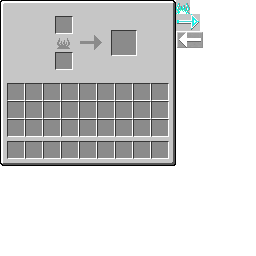
With the container keeping the client's fields up to date, the screen's job is almost trivial: read progress and fuelRemaining through the scaled getters and blit a partial sprite.
package com.example.example_mod;

import org.lwjgl.opengl.GL11;

import net.minecraft.client.gui.screen.ingame.HandledScreen;
import net.minecraft.entity.player.PlayerInventory;

public class ExampleFreezerScreen extends HandledScreen {

	private static final String TEXTURE = "/assets/example_mod/textures/gui/freezer.png";

	private final ExampleFreezerBlockEntity freezer;

	public ExampleFreezerScreen(PlayerInventory playerInventory, ExampleFreezerBlockEntity freezer) {
		super(new ExampleFreezerContainer(playerInventory, freezer));
		this.freezer = freezer;
	}

	@Override
	protected void drawForeground() {
		this.textRenderer.draw(this.freezer.getName(), 60, 6, 0x404040);
		this.textRenderer.draw("Inventory", 8, this.backgroundHeight - 96 + 2, 0x404040);
	}

	@Override
	protected void drawBackground(float tickDelta) {
		int texture = this.minecraft.textureManager.getTextureId(TEXTURE);
		GL11.glColor4f(1.0F, 1.0F, 1.0F, 1.0F);
		this.minecraft.textureManager.bindTexture(texture);
		int left = (this.width - this.backgroundWidth) / 2;
		int top = (this.height - this.backgroundHeight) / 2;
		this.drawTexture(left, top, 0, 0, this.backgroundWidth, this.backgroundHeight);

		// The flame: drains downward as fuel runs out (12px tall sprite at u=176,v=0).
		if (this.freezer.isBurning()) {
			int flame = this.freezer.getFuelRemainingScaled(12);
			this.drawTexture(left + 57, top + 47 - flame, 176, 12 - flame, 14, flame + 2);
		}

		// The arrow: fills rightward as freezing progresses (24px wide sprite at u=176,v=14).
		int arrow = this.freezer.getProgressScaled(24);
		this.drawTexture(left + 79, top + 35, 176, 14, arrow + 1, 16);
	}
}
Both sprites are partial blits of a region in the GUI texture. The flame draws from scaled pixels tall, anchored at the bottom so it shrinks downward as fuel burns; the arrow draws scaled + 1 pixels wide so it grows rightward as the freeze completes. The bar art lives in the same PNG as the window, tucked to the right of the window area at u ≥ 176, the same trick vanilla's furnace.png uses.
The block, and the registrations
The block itself is the crate's twin, register the block entity, register the block, open the GUI in onUse:
@Override
public boolean onUse(World world, int x, int y, int z, PlayerEntity player) {
	BlockEntity be = world.getBlockEntity(x, y, z);
	if (be instanceof ExampleFreezerBlockEntity) {
		ExampleFreezerBlockEntity freezer = (ExampleFreezerBlockEntity) be;
		RetroGuis.openGUI(player, ExampleMod.id("freezer"), freezer,
			new ExampleFreezerContainer(player.inventory, freezer));
	}
	return true;
}RetroBlockEntities.register(id("freezer"), ExampleFreezerBlockEntity.class);
FREEZER_BLOCK = RetroBlockAccess.of(new ExampleFreezerBlock(RetroBlockAccess.allocateId()))
.sounds(Block.STONE_SOUND_GROUP)
.strength(3.5f)
.texture(id("freezer_block"))
.register(id("freezer_block"));The orientable block uses three faces, all under src/main/resources/assets/example_mod/textures/block/: the frosted door freezer_front.png, the panels freezer_side.png, and the lid freezer_top.png.


RetroGuiRegistry.register(ExampleMod.id("freezer"), new RetroGuiHandler(
	(player, inventory) -> new ExampleFreezerScreen(player.inventory, (ExampleFreezerBlockEntity) inventory),
	ExampleFreezerBlockEntity::new));
Three machines, one shape. The counter taught you NBT and the stable-id rule; the crate taught you the three-piece container pattern; the freezer taught you the one thing that turns a static window into a living machine, synced properties, one per value you draw.
Your world now has machines that remember, store, and work. Next we give it something that moves on its own: a creature, and the surprisingly deep question of how a server tells everyone it exists.